Poses
ChibiChu Custom Poses: How the Pose Editor Works
How custom poses work in ChibiChu: build a pose part by part, name it and reuse it in studio scenes, and what the project leaves undocumented.
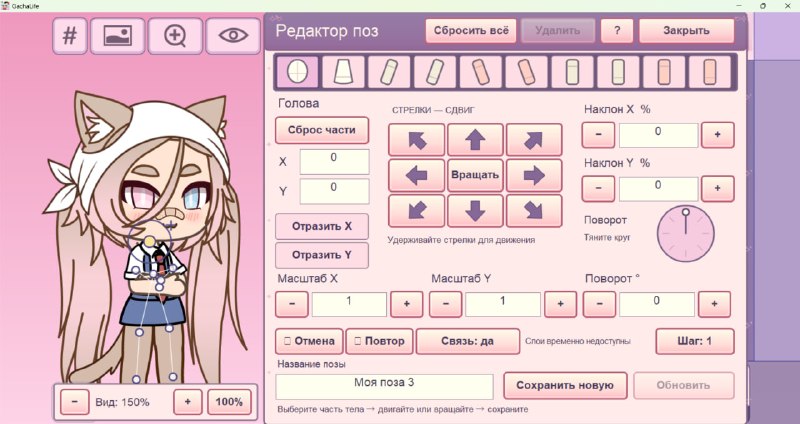
What the pose editor is for
Gacha Life's poses come as fixed sets. ChibiChu lets you build a pose yourself: pick a body part, move it, rotate it, resize it, and repeat until the stance reads. Then you name it and keep it.
That sounds like a small thing and is not. It is the difference between a character standing in one of nine poses and a character doing the thing you had in mind.
Making a pose, one part at a time
- Start from a neutral stance. A clean base makes a bad adjustment obvious; a dramatic base hides it.
- Place the big masses first — torso, then legs, then arms. Small parts moved before the body reads properly usually have to be redone.
- Work outward. Hair and accessories go last, because they have to sit on top of everything else.
- Check at 100%. Work zoomed out and the edges of two parts can overlap without you ever seeing it.
- Name and save it before you leave the editor.
Saving and reusing
A saved pose stays available for the next scene, which is what makes the studio scenes worth using: set the scene once, then swap characters into it. If you are building a set of poses for one character, save them in the order you will need them rather than the order you made them.
What makes a pose look wrong
- Two parts in the same space. The usual cause of a limb that "won't go right" — something else is already occupying that area.
- Rotated but not moved. Rotation happens around a pivot, so a limb can swing far away from the body when you only touched the angle.
- Hair placed before the head moved. Any head adjustment means re-placing the hair afterwards.
- Outline colour left at default. On a dark palette the default outline is what makes a pose look flat next to the rest of the character.
What this page does not claim
Two things are not documented by the project, so this page will not invent them: whether poses can be exported or imported between devices, and whether a pose can be shared with another player. Character codes carry characters. Until the project says otherwise, treat poses as local to your own build.
Next
Poses are one part of the editor. The feature list covers the other ten, and the step-by-step walkthrough puts poses where they belong in the workflow — after the design, before the export.